
How To
Mailplane – the best way to manage multiple Gmail accounts


- November 5, 2009
- Updated: July 2, 2025 at 9:19 AM
 One of the frustrating things about having multiple Gmail accounts is managing them all at the same time. Until recently, I’d been using the Firefox Gmail Manager Plugin but it’s an absolute pain because having two different Gmail accounts open in separate tabs automatically logs you out of both accounts after a few seconds. This is even more annoying if you’ve got other Google apps open at the same time because it logs you out of those too. The best answer I’ve found to this problem is Mailplane.
Mailplane was actually created back in the days when you needed access to your Gmail account from your desktop but IMAP support wasn’t yet available. Nowadays you can consult Gmail from any mail client like Mail.app or Thunderbird but unlike Mailplane, none of them are made specifically for the use of Gmail or make managing multiple accounts so easy.
Like a mail client, Mailplane works outside of your browser. Along the top of the interface, you have buttons for replying, sending, printing, forwarding etc much like any other mail client. There are also buttons for quickly adding photos (with special integration for iPhoto) and managing downloaded items. Alternatively, you can drag and drop attachments such as photos and documents onto mail while you’re composing it which is another very nice feature of Mailplane. A similar feature also works for taking screenshots and sending them instantly via Gmail.
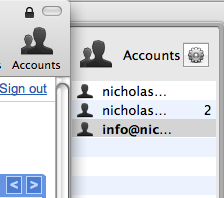 You can add as many accounts as you want using the Accounts button. When new mail arrives, a Mailplane icon in your Menu bar will indicate how many are waiting to be read and each account features a number next to it indicating the amount of mail in that particular inbox. I like the fact that by clicking on the Menu bar icon, a drop down menu shows you the subject heading of unread mail in each inbox. The big advantage I’ve found though is that managing multiple inboxes with Mailplane is so much easier than doing it in your browser.
Although you can’t have more than one Gmail inbox at the same time, Mailplane makes switching between them much quicker and less hassle that in Firefox. In future, it would be nice to see a simultaneous open inboxes feature in the app but until then, it’s the best way of managing multiple Gmail inboxes I’ve found.
You may also like
 News
NewsThe most interesting indie of the year puts us in the shoes of a crystal demon who skateboards
Read more
 News
NewsAccording to the author of Percy Jackson, the series is more faithful to his books than the movies
Read more
 News
NewsMike Tyson took almost 30 years to discover that an iconic video game character was inspired by him
Read more
 News
NewsWarner Bros. is strongly opposed to Paramount's hostile takeover bid
Read more
 News
NewsCon 26 años a sus espaldas, esta franquicia de juegos de estrategia y RPG anuncia la fecha de lanzamiento de su nueva entrega
Read more
 News
NewsWhat is Fantastic Frontiers? The new trend that Adobe Firefly helps you create effortlessly
Read more